Skip to the main content
3D Body Visualizer

3D body visualizer app

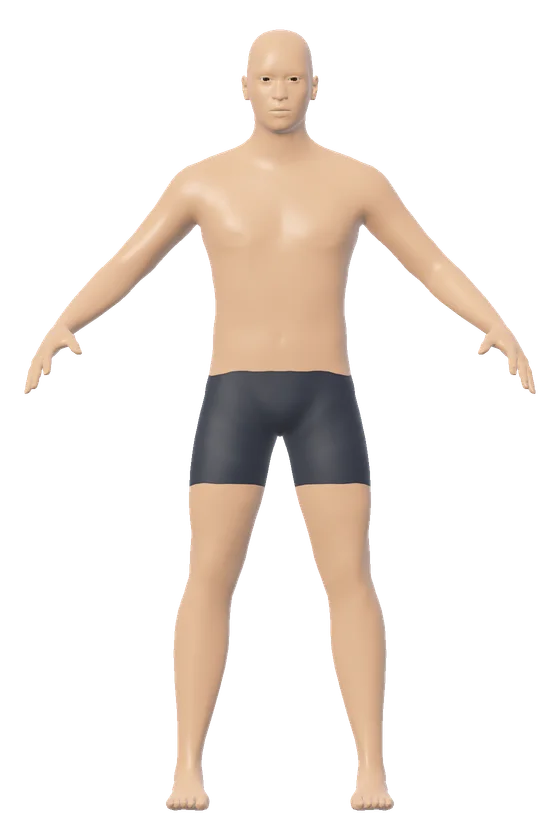
A male figure 178 cm tall weighing 78 kg, seen from the front

What these numbers come to

Body mass index
24.6 Healthy weight
Waist to hip
0.85 below 0.90
Waist to height
0.47 Healthy central adiposity

Chest 99.8, waist 84.2, hips 98.7 cm.

A BMI of 18.5 to 24.9 at this height is 58.6 kg to 78.9 kg.

Height
cm
ft
in
Weight
kg
lb
st
lb

Measurements

Each one starts as the model's estimate. Type or drag to set your own.

estimated
cm
estimated
cm
estimated
cm
estimated
cm
estimated
cm
estimated
cm
estimated
cm
estimated
cm
estimated
cm
estimated
cm
More measurements
estimated
cm
estimated
cm
estimated
cm
Where each tape measurement is taken
Bust or chest
Around the fullest part of the chest, tape level all the way round.
Under bust
Around the ribcage, directly under the bust.
Waist
Around the natural waist, the narrowest level between the ribs and the hips.
Hips
Around the widest part of the buttocks, tape level.
Inseam
Inside of the leg, from the crotch straight down to the floor.
Shoulder width
Straight across, from the bony point at the outer end of one shoulder to the other.
Neck
Around the middle of the neck.
Upper arm
Around the middle of the upper arm, arm relaxed.
Thigh
Around one thigh at its upper, fullest part.
Calf
Around the widest part of one calf.
Wrist
Around the wrist, just above the hand.
Knee
Around the knee, leg straight.
Ankle
Around the narrowest part of the lower leg, above the ankle bone.

Body shape

The typical shape for this height, weight and build in the model.

Look

What these numbers come to

Body mass index
24.6 Healthy weight
Waist to hip
0.85 below 0.90
Waist to height
0.47 Healthy central adiposity

Chest 99.8, waist 84.2, hips 98.7 cm.

A BMI of 18.5 to 24.9 at this height is 58.6 kg to 78.9 kg.

The figure is an estimate drawn from a general body model. Two people with the same numbers can carry their weight differently, so treat it as a likeness, not a scan.

The 3D body visualizer app is the 3D body visualizer running in a phone browser, with nothing to download from an app store. Added to the home screen of an iPhone or an Android phone, the tool gets its own icon and opens in its own window. The figure on the page is the male figure of 178 cm (5 ft 10 in) and 78 kg (172 lb).

How the 3D body visualizer app works

The 3D body visualizer app works as a web page that draws in 3D inside the browser. The drawing uses WebGL, which the Khronos Group describes as a web standard that brings plugin-free 3D to the browser. The numbers typed in stay on the phone.

To keep the app on a phone, add the page to the home screen. Apple and Google each publish the steps.

Apple's guide says a website added this way opens just like an app.
Phone Browser Steps from the maker's help page
iPhone Safari Tap Share, tap Add to Home Screen, turn on Open as Web App, tap Add
Android phone Chrome Tap More, choose Install and create shortcut, tap Create shortcut, tap Add

Apple's guide says that an icon is added to the Home Screen and that the website then opens just like an app. A small file called a web app manifest tells the browser the name and the icon to use, as MDN Web Docs explains.

On a phone, one finger turns the figure, a pinch zooms and two fingers slide the view. The inputs sit under the figure, and the figure stays in view while the numbers change.

3D body visualizer app formula

The 3D body visualizer app works out 3 numbers on the phone for every body: body mass index (BMI), waist to hip ratio and waist to height ratio.

At 178 cm and 78 kg, the male figure has a BMI of 24.6 and a waist to height ratio of 0.47.
Formula For the opening figure
BMI = weight in kg ÷ height in m, squared 78 ÷ (1.78 × 1.78) = 24.6
Waist to hip ratio = waist ÷ hips 84.2 ÷ 98.7 = 0.85
Waist to height ratio = waist ÷ height 84.2 ÷ 178 = 0.47

A BMI of 24.6 is in the CDC's healthy weight category of 18.5 to under 25. The waist and hips are the model's estimates for 178 cm and 78 kg until a tape measurement is typed in.

3D body visualizer app conversion chart

The 3D body visualizer app takes centimeters and kilograms, feet, inches and pounds, or feet, inches, stone and pounds. Switching units keeps every value.

A height of 178 cm is 5 ft 10 in, and a weight of 78 kg is 172 lb or 12 st 4 lb.
Height In feet and inches Weight In pounds In stone and pounds
150 cm 4 ft 11 in 50 kg 110 lb 7 st 12 lb
160 cm 5 ft 3 in 60 kg 132 lb 9 st 6 lb
170 cm 5 ft 7 in 70 kg 154 lb 11 st 0 lb
178 cm 5 ft 10 in 78 kg 172 lb 12 st 4 lb
190 cm 6 ft 3 in 90 kg 198 lb 14 st 2 lb

For a figure from 2 numbers only, open the view with a height and weight chart. For tape numbers, open the figure with its tape lines on. The guide on how to choose a 3D body visualizer lists what to check in any tool of this kind.

More body tools

Questions people ask

Is there a 3D body visualizer APK to download?

No. There is no APK file and no listing in an app store. The 3D body visualizer is a web page, and a phone can add that page to its home screen without downloading an installer.

Does the 3D body visualizer app work on an iPhone?

Yes. The 3D body visualizer runs in Safari on an iPhone. Apple's guide gives the steps to keep it on the Home Screen: tap Share, tap Add to Home Screen, turn on Open as Web App, then tap Add.

Does the app work without an internet connection?

No. The page and the body model load from the internet each time the app opens. After they load, every number is worked out on the phone, and nothing typed in is sent to a server.

Is the 3D body visualizer app free?

Yes. The 3D body visualizer app is free, with no account, no subscription and no purchase inside it.

Does the app keep my measurements?

No. The app has no account and stores no history. The copy button makes a link that carries the numbers inside the link itself, and saving that link is the way to keep a body.

5 sources
  1. Turn a website into an app in Safari on iPhone, Apple Support. Accessed 14 November 2026.
  2. Create shortcuts for websites in Chrome, Google Chrome Help. Accessed 14 November 2026.
  3. Web application manifest, MDN Web Docs. Accessed 14 November 2026.
  4. WebGL: Low-Level 3D Graphics API Based on OpenGL ES, The Khronos Group. Accessed 14 November 2026.
  5. Adult BMI Categories, Centers for Disease Control and Prevention. Accessed 14 November 2026.